
Retrieval Augmented Generation (RAG) is an advanced AI framework that enhances the capabilities of large language models (LLMs) by integrating them with external knowledge bases. Instead of responding solely from their fixed training data, LLMs using RAG first retrieve relevant information from a search database or knowledge source and then generate more contextual and accurate answers using that information.
Key points:
- RAG bridges the gap between retrieval-based models and generative models for more factual, up-to-date, and domain-specific results.
- This approach allows chatbots and AI applications to use the latest data or internal organizational content without extensive retraining or fine-tuning of the model.
- RAG helps minimize AI hallucinations (fabricated outputs) by grounding responses in retrieved, verifiable content.
Basic Example: Hugging Face Embedding Model + PostgreSQL pgvector
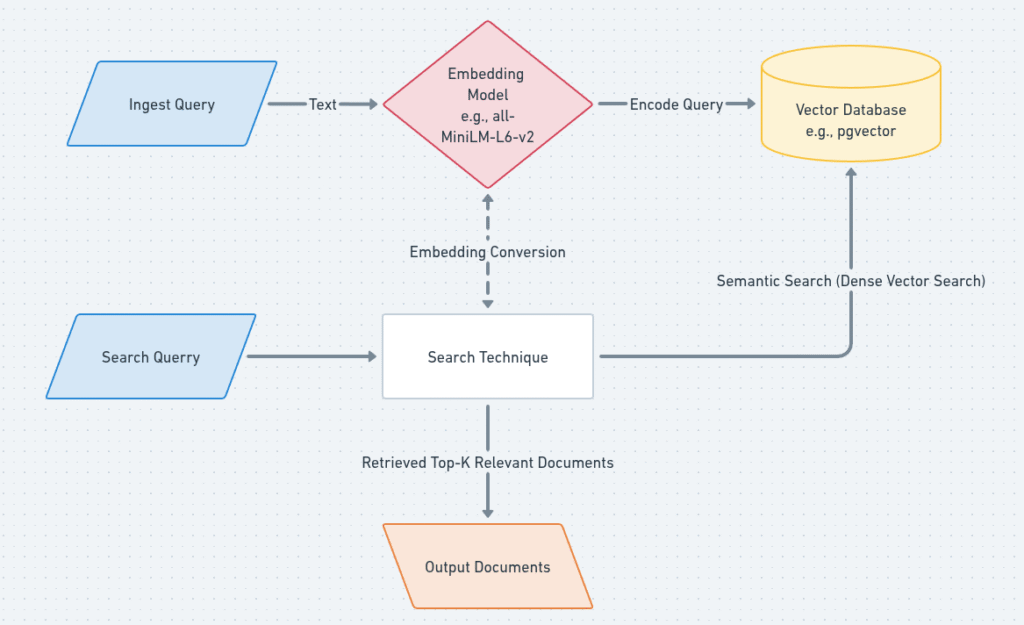
Here’s a step-by-step outline with code snippets for building a basic RAG pipeline using Hugging Face open-source embedding models and pgvector (the popular vector extension for PostgreSQL):
1. Create Embeddings with a Hugging Face Model
In machine learning, an embedding is a numerical representation of data, like words, images, or other objects, that captures their semantic meaning and relationships.
First install this library:
pip install sentence-transformersYou can use pre-trained models from Hugging Face’s Sentence Transformers to create dense embeddings for your text data:
from sentence_transformers import SentenceTransformer

# Load a pre-trained embedding model
model = SentenceTransformer('all-MiniLM-L6-v2')

text = ["This is an example sentence", "Another sentence to embed"]
embeddings = model.encode(text)
print(embeddings.shape) # Output: (2, 384) for this modelThis will give you an array of vector embeddings representing your texts.
2. Storing Embeddings in PostgreSQL Using pgvector
First, make sure you have the pgvector extension installed in your Postgres database.
pgvector is a PostgreSQL extension that adds support for storing, querying, and indexing vectors, which are lists of numbers, within a PostgreSQL database.
A vector database is a specialized database designed to store and manage data in the form of vectors, which are numerical representations of data points, often used in machine learning and AI applications.
a) Create the embeddings table:
CREATE TABLE embeddings (
    id bigserial PRIMARY KEY,
    title text,
    content text,
    embedding vector(384)
);
Use 384 as the dimension if you use ‘all-MiniLM-L6-v2’; adjust for your model’s embedding size.
b) Inserting embeddings:
You can insert using a Python script (here using psycopg2):
import numpy as np
import psycopg2

# Example connection and insertion
conn = psycopg2.connect("dbname=your_db user=your_user password=your_pwd host=localhost")
cur = conn.cursor()

# For each record
embedding_vector = embeddings.tolist()  # Convert numpy array to list
cur.execute(
    "INSERT INTO embeddings (title, content, embedding) VALUES (%s, %s, %s)",
    ("Example Title", "This is an example.", embedding_vector)
)
conn.commit()
cur.close()
conn.close()
You can batch insert multiple embeddings for efficiency.
c) Querying for Similarity:
To find documents similar to a query embedding:
SELECT id, title, content
FROM embeddings
ORDER BY embedding <-> '[EMBEDDING_VECTOR]'::vector
LIMIT 5;
This uses the <-> operator for vector similarity search (Euclidean, cosine, etc.).
3. How RAG Ties It All Together
In a full RAG setup, you would:
- Encode your document corpus into embeddings and store them in Postgres with pgvector.
- When a user asks a question, encode the question, perform a vector similarity search in Postgres to find relevant texts, and pass these texts as extra context to your LLM for answer generation.
- This provides the model with up-to-date and domain-specific information, greatly improving factuality and reducing hallucinations.
References to Explore Deeper
- IBM, Google Cloud, and Wikipedia articles on RAG for conceptual background.
- LlamaIndex, Hugging Face, and LangChain documentation for up-to-date code examples with Hugging Face models and embeddings integration.
- pgvector official and recent tutorials for Postgres vector storage and search.