
Introduction
Have you ever wondered how your phone can “hear” what you say and instantly type it out for you? Or how voice assistants like Siri or Alexa seem to understand your spoken commands? This magic happens thanks to a technology called Automatic Speech Recognition (ASR), which converts spoken language into written text in real time.
In simple terms, ASR uses artificial intelligence (AI) and machine learning to help machines “listen” to your voice and transform your words into text. This technology powers everything from voice assistants to live captions on video calls. In this article, we’ll explore how speech to text works, why it’s so useful, and what happens behind the scenes.
Table of Contents
What is Speech to Text and ASR?
Speech to text refers to the process where your spoken words are converted into written text automatically. Automatic Speech Recognition (ASR) is the technology that makes this possible, by analyzing your voice signals and understanding what you say.
Instead of typing, you just speak — and ASR systems listen, interpret, and write down your speech as text. Thanks to AI models like OpenAI Whisper, ASR systems have become faster and more accurate than ever.
Real-World Examples of ASR in Action
ASR isn’t just a fancy concept — it’s everywhere around us. Some common examples include:
- Voice Assistants: Siri, Alexa, and Google Assistant rely on ASR to understand your spoken commands and respond.
- Live Captions: Platforms like Zoom, Google Meet, and YouTube generate real-time captions during video calls or streams, helping people follow conversations better.
- Dictation Tools: Google Docs voice typing lets you write hands-free by simply speaking.
- Call Center Transcripts: Customer service centers use ASR to automatically create transcripts of phone calls, which helps analyze conversations and improve service.
- Accessibility Tools: People who are deaf or hard of hearing benefit greatly from ASR-powered captions and transcripts.
What Does an ASR System Do?
At its core, an ASR system:
- Turns your voice into text: As you talk, the system listens carefully.
- Works in real time: You don’t have to wait for minutes — your speech is converted to text instantly.
- Shows the text instantly: You see your spoken words appear on the screen as you say them.
This seamless process helps users communicate faster and more efficiently.
How Does Speech to Text Work? (High-Level Overview)
Here’s a simple breakdown of what happens when you use a speech-to-text system:
- You speak into a microphone: Your device’s mic captures your voice.
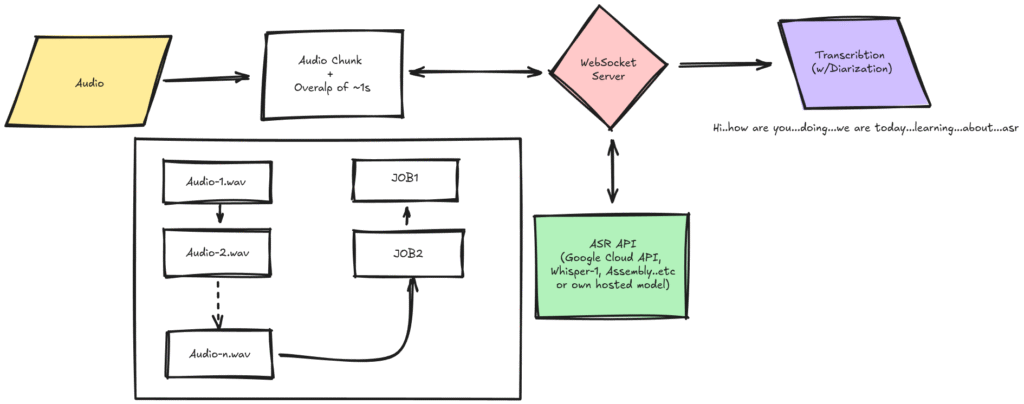
- Audio is recorded in short chunks: Typically, these are small pieces of sound lasting about 5 seconds each.
- Audio chunks are sent to a server: These chunks stream in real time to a backend server using a special connection called WebSocket.
- AI processes the audio: The server uses an AI model, such as OpenAI Whisper, to analyze the sound and convert it into text.
- The text is sent back to your screen: Instantly, the transcribed words appear on your display as you continue talking.
This entire process happens quickly enough to feel like magic!
Why Is ASR Useful?
Here are some big reasons why speech to text technology matters:
- Live Captions: Helpful for people who are hard of hearing or when you’re in a noisy place. You get subtitles for what’s being said in real time.
- Meeting Notes: Instead of typing or writing notes during a meeting, the ASR system listens and captures everything for you.
- Hands-Free Typing: Perfect for multitasking or for those who can’t use a keyboard. Just speak and watch the words appear.
- Improves Accessibility: Makes digital content and communication easier for everyone, including people with disabilities.
- Saves Time: Speeches, interviews, and calls can be transcribed automatically, cutting down on manual work.
For Developers: How ASR Works Behind the Scenes
If you’re curious about the technical side, here’s an overview of how developers build these systems:
Architecture Overview
The speech-to-text system has two main parts:
- Frontend (Browser)
- Backend (Server)
Frontend (Browser)
- Audio Capture: The browser accesses your microphone using a tool called
getUserMedia(). - Audio Encoding: Your voice is recorded and encoded into small audio files (WAV format).
- WebSocket Connection: These audio chunks are sent live over a WebSocket — a type of connection that stays open for continuous data flow.
- Transcript Display: The text that the server transcribes is displayed live on your screen.
Backend (FastAPI Server)
- WebSocket Endpoint: The server receives audio streams from your browser.
- Temporary File Creation: Each audio chunk is saved temporarily as a .wav file.
- OpenAI Whisper Integration: This audio file is sent to the Whisper ASR model for transcription.
- Send Transcription Back: The text result is sent back to your browser via the same WebSocket.
- Cleanup: Temporary files are deleted, and any errors are handled gracefully.
WebSocket Flow: How Live Transcription Happens
Here’s a simple step-by-step of the live transcription flow:
- Your browser connects to the ASR server over WebSocket.
- Your microphone captures your speech and sends small audio blobs continuously.
- The server saves these audio chunks and sends them to the ASR model (like Whisper).
- The AI converts the speech into text.
- The text is instantly sent back to your browser.
- Your screen updates in real time to show the transcription.
Why Temporary File Handling Is Important
The ASR model needs actual audio files to work with, not raw audio streams. So, the server creates small temporary WAV files from the incoming audio data.
Once transcription is done, these files are deleted to keep the system clean and efficient. This also protects your privacy by not storing your voice longer than necessary.
Error Handling and Reliability
The system catches errors (like network issues or bad audio) and informs users with simple messages, so the app doesn’t crash or freeze. Meanwhile, logs are kept to help developers fix issues quickly.
Final Thoughts
Automatic Speech Recognition is transforming how we interact with technology. Whether you’re talking to your smart assistant, joining a virtual meeting, or just dictating notes, ASR is there to make communication easier and faster.
By turning your voice into text in real time, ASR helps save time, improve accessibility, and create new ways for people to work and connect — all powered by cutting-edge AI models like OpenAI Whisper.
If you want to try speech to text yourself, many tools and APIs are available today that can integrate this amazing technology into your apps, websites, or devices!